

Mensajería privada TeraMail para empresas
-
Secure messaging and file delivery between authorized users.
-
Browser-based access from Edge, Chrome, Firefox, Safari, and other modern browsers.
-
Instant two-way communication between desktop users and TeraMessage Mobile users.
-
Exchange sensitive documents, images, and files without relying on public email systems.
-
Delivery confirmation, read receipts, and communication audit logs.
-
Private enterprise communications under your organization's control.
Crea el entorno de comunicación privado de tu empresa.
TeraMail proporciona a su organización un entorno privado y controlado para comunicarse con empleados, clientes, contratistas, consultores, proveedores y socios comerciales.
Su organización determina quién está autorizado a participar y utiliza grupos para controlar quién puede comunicarse con quién.
Los usuarios de ordenadores de escritorio y navegadores web se comunican con TeraMail.
Los usuarios de smartphones se comunican con TeraMessage Mobile.
Juntos, crean un servicio de comunicación empresarial privado para intercambiar mensajes y archivos sin depender de SMS, WhatsApp u otras aplicaciones de mensajería para consumidores.
Empieza con TeraMail: no se requiere TeraKey.
TeraMail funciona de forma independiente de TeraKey.
Los usuarios autorizados acceden a TeraMail a través de Edge, Chrome, Firefox, Safari u otros navegadores web modernos sin necesidad de instalar software ni extensiones de navegador.
Sus empleados pueden comunicarse de forma privada entre sí, mientras que personas seleccionadas ajenas a su organización también pueden registrarse como usuarios autorizados.
Por ejemplo, puede agregar un cliente, contratista, consultor, proveedor o socio comercial a su servicio TeraCryption, asignarle acceso a TeraMail y ubicar a esa persona en el grupo correspondiente.
El usuario recibe credenciales para acceder a su entorno de comunicación privado y puede intercambiar mensajes y archivos con las personas que su organización haya autorizado.
Extienda las comunicaciones privadas a los usuarios de dispositivos móviles.
TeraMessage Mobile extiende el mismo entorno de comunicación privada a los usuarios autorizados de teléfonos inteligentes.
Los usuarios de TeraMail que trabajan desde ordenadores pueden intercambiar mensajes con los usuarios de TeraMessage Mobile que trabajan desde teléfonos inteligentes, lo que permite que el personal de oficina, los empleados remotos, el personal de campo, los gerentes y otros usuarios autorizados permanezcan conectados dentro del entorno de comunicación controlado de la organización.
Agregue TeraKey cuando los archivos necesiten protección en reposo.
No es necesario usar TeraKey para utilizar TeraMail.
Si su organización también necesita que los archivos permanezcan cifrados después de ser entregados y almacenados en ordenadores autorizados, puede añadir TeraKey para extender la protección de las comunicaciones privadas al cifrado persistente a nivel de archivo.
Las organizaciones que utilizan TeraKey también pueden intercambiar archivos protegidos con TeraKey a través de TeraMail y utilizar los flujos de trabajo de intercambio seguro de archivos de TeraCryption.
Empiece con las comunicaciones privadas. Añada protección permanente de archivos cuando su organización lo necesite.
Cómo funciona TeraMail
Your Organization Controls Who Can Participate
El administrador de TeraCryption crea y gestiona los usuarios y grupos que conforman su entorno de comunicación privado.
Los empleados pueden organizarse en grupos según departamentos, proyectos, responsabilidades u otros requisitos empresariales. También se pueden añadir clientes, contratistas, consultores, proveedores y socios comerciales seleccionados, asignándolos únicamente a los grupos en los que estén autorizados a participar.
Esto le da a su organización control sobre quién ingresa al entorno de comunicación y quién puede comunicarse con quién.
Agregar un empleado, cliente o socio comercial
Para agregar un nuevo usuario de TeraMail, el administrador crea la cuenta del usuario, introduce la información de contacto necesaria, le asigna acceso a TeraMail y lo ubica en el grupo correspondiente.
El sistema envía al nuevo usuario un correo electrónico con un nombre de usuario y una contraseña temporal.
No se requiere la instalación de TeraKey. El usuario simplemente abre el servicio TeraCryption en un navegador web moderno e inicia sesión.
Durante el registro inicial, el usuario debe crear una contraseña privada. Al iniciar sesión posteriormente, se envía un código de verificación por SMS al teléfono móvil registrado del usuario para verificar su identidad.
El usuario ahora está autorizado a participar en el entorno de comunicación privada de su organización de acuerdo con los grupos y permisos que usted le haya asignado.
Envío de un mensaje privado y un archivo
Un usuario autorizado de TeraMail puede redactar un mensaje privado y adjuntar uno o más archivos.
El mensaje y los archivos se transmiten al servicio TeraCryption mediante una conexión protegida TLS 1.3. Al llegar, el servicio TeraCryption cifra el mensaje y los archivos adjuntos, y los almacena por separado hasta su entrega al destinatario autorizado.
El mensaje y los archivos confidenciales no se envían a través del correo electrónico público.
Notificación inmediata de nuevos mensajes
Cuando llega un nuevo correo de TeraMail, PageRouter notifica inmediatamente al destinatario.
Si el destinatario está utilizando TeraMail, una alerta sonora y una notificación intermitente anuncian el mensaje pendiente.
Si el destinatario no ha iniciado sesión, TeraCryption le envía una notificación por correo electrónico estándar informándole de que tiene un mensaje confidencial pendiente. El mensaje confidencial en sí no se incluye en la notificación.
El destinatario inicia sesión en TeraMail para recuperarlo.
Cierre de sesión automático y funcionamiento continuo
TeraMail puede dar cabida tanto a usuarios individuales como a estaciones de trabajo con personal permanente.
Para cada usuario, el administrador puede habilitar el cierre de sesión automático después de 20 minutos sin actividad del ratón. Esto ayuda a proteger las sesiones de TeraMail desatendidas cuando los usuarios se alejan de sus ordenadores.
Para los usuarios que necesitan que TeraMail esté disponible de forma continua, como supervisores, personal de despacho, recepcionistas u otros puestos con personal permanente, el administrador puede permitir que TeraMail permanezca conectado mientras la estación de trabajo esté en funcionamiento.
Si se interrumpe la conexión a Internet, TeraMail cierra automáticamente la sesión del usuario, requiriendo autenticación al volver a conectarse al servicio.
Sepa cuándo se ha leído su mensaje.
When the recipient opens the TeraMail notification, the sender receives confirmation that the message has been read.
This provides business users with immediate message status instead of wondering whether an important communication was received or opened.
Entrega segura de archivos
Los archivos adjuntos a un correo TeraMail se almacenan por separado del mensaje y permanecen protegidos mientras esperan su entrega.
Cuando el destinatario autorizado selecciona el enlace del archivo, este se recupera y se entrega a través de la conexión protegida de TeraMail. A continuación, el destinatario puede descargar el archivo a su ordenador.
Cuando se utiliza TeraMail sin TeraKey , el archivo descargado no está protegido por TeraKey mientras está en reposo.
Si su organización requiere que el archivo permanezca cifrado después de la entrega, se puede agregar TeraKey para proporcionar protección persistente a nivel de archivo en las computadoras autorizadas.
TeraMail protege la comunicación privada y el proceso de entrega. Se puede añadir TeraKey cuando el archivo deba permanecer protegido tras su entrega.
¿Por qué las organizaciones eligen TeraMail?
TeraMail ofrece a las organizaciones un servicio de comunicación privado que ellas mismas controlan, conectando a los empleados con participantes externos seleccionados sin necesidad de TeraKey.
Tu comunidad de comunicación privada
Su organización determina quién está autorizado a participar en su entorno privado de TeraMail.
Comunicaciones internas y externas
Conectar a los empleados con clientes, contratistas, consultores, proveedores y socios comerciales seleccionados.
Ordenadores de sobremesa y móviles
TeraMail conecta a los usuarios de ordenadores de escritorio y navegadores con los usuarios autorizados de TeraMessage Mobile en teléfonos inteligentes.
Control basado en grupos
Organice los usuarios y los permisos de comunicación por departamento, proyecto, cliente, ubicación u otra relación comercial.
Responsabilidad del mensaje
Realizar un seguimiento del estado de los mensajes y las confirmaciones de lectura, con registros de comunicación y registros de auditoría disponibles para la revisión administrativa autorizada.
Entrega programada
Programe la entrega de mensajes y archivos privados en la fecha y hora adecuadas sin enviar contenido confidencial a través del correo electrónico público.
Aplicaciones Empresariales
Cualquier organización que necesite comunicaciones privadas y controladas entre empleados y participantes externos seleccionados puede utilizar TeraMail y TeraMessage Mobile.
Las aplicaciones incluyen:
-
Industria manufacturera y fábricas.
-
Empresas de ingeniería.
-
Agentes financieros y servicios financieros.
-
Compañías de seguros y corredores.
-
Bufetes de abogados y servicios profesionales.
-
Firmas de contabilidad y consultoría.
-
Laboratorios y organizaciones de investigación.
-
Oficinas corporativas y departamentos empresariales.
-
Organizaciones de construcción e inmobiliarias.
-
Distribuidores y proveedores.
-
Organizaciones de servicios.
-
Empresas que trabajan con empleados, contratistas, clientes o socios comerciales que trabajan de forma remota.
TeraMail proporciona un entorno de comunicación privado. Su organización determina quién participa y quién puede comunicarse con quién.
Crea el entorno de comunicación privado de tu empresa.
TeraMail ofrece a su organización una forma práctica de establecer comunicaciones privadas entre los empleados y los clientes, contratistas, proveedores, consultores y socios comerciales que usted decida incluir.
Comience con TeraMail para comunicaciones basadas en navegador. Añada TeraMessage Mobile para usuarios de teléfonos inteligentes. No se requiere la instalación de TeraKey.
Tu organización controla a los usuarios. Tu organización controla los grupos. Tu organización determina quién puede comunicarse con quién.
Descubre cómo TeraMail puede convertirse en el servicio de comunicación privada de tu empresa.
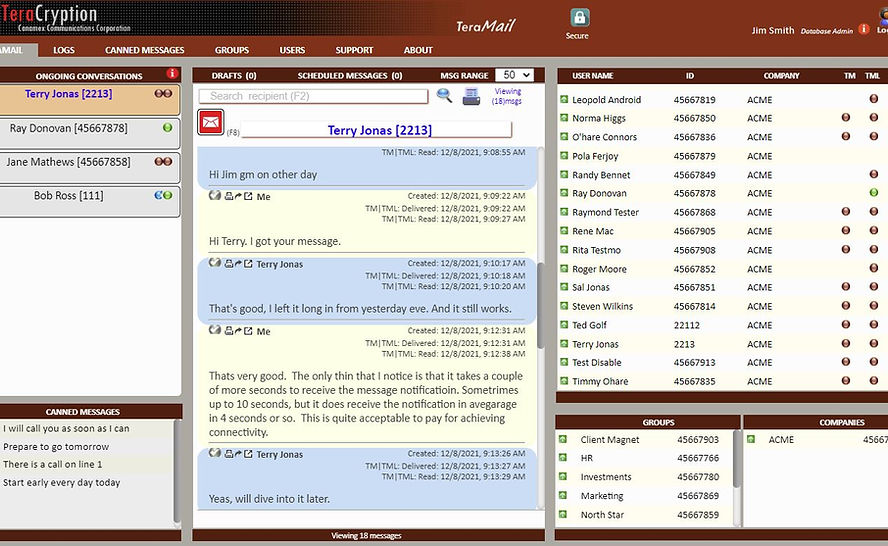
Haz clic en el nombre de la conversación en curso a la izquierda para seleccionar un destinatario o elígelo del directorio en el panel derecho. Los mensajes de correspondencia se muestran en el centro de la pantalla para mayor comodidad.